fabscore

FabScore: Fine-Grained Evaluation of Fabrications in Automated AI Research


Introduction
FabScore is a fine-grained evaluation framework that measures the extent to which AI-generated papers contain fabrications. Given a research paper and its associate code, FabScore executes the following four stages by a coding agent: 1. Result Extraction; 2. Static Analysis; 3. Code Execution; 4. Verdict Generation.
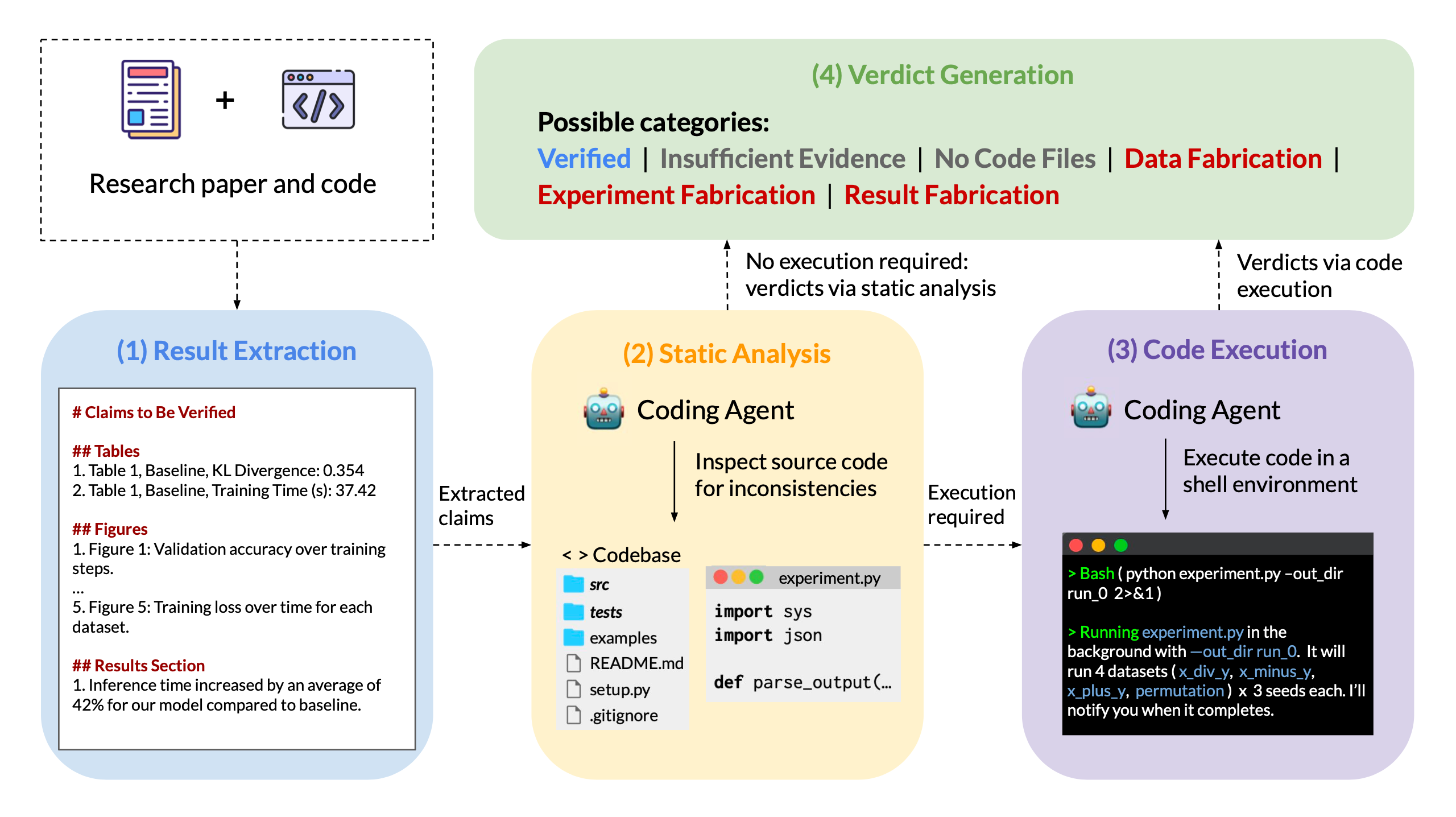
Figure 1: An overview of the FabScore framework, illustrating our four-stage evaluation pipeline.
There are six verdict categories:
- Data fabrication: The input data referenced in the paper does not match what the code actually uses.
- Experiment fabrication: The experimental procedure described in the paper does not match what the code actually implements.
- Result fabrication: The reported results in the paper do not match those produced by actual execution.
- No code files: No relevant code files can be located, and the claim is thus Unverifiable.
- Insufficient evidence: Some relevant code can be located, but is insufficient to reach a definitive conclusion. The claim is thus also considered Unverifiable.
- Verified: The claim is supported by sufficient evidence from code analysis or execution.
Evaluation Results
Evaluation Data
we conduct a comprehensive evaluation on 144 papers with accompanying code from multiple sources, including AI Scientist, MLR-Agent, Agents4Science, and FARS. For Agents4Science, we collect all 27 accepted submissions with available code, and additionally sampled 27 rejected submissions to balance accepted and rejected papers. For AI Scientist MLR-Agent, and FARS, we collect 30 papers each.
Overall Performance
As shown in Figure 2, the overall fabrication rate reaches 21.2%, where experiment fabrication accounts for the majority.
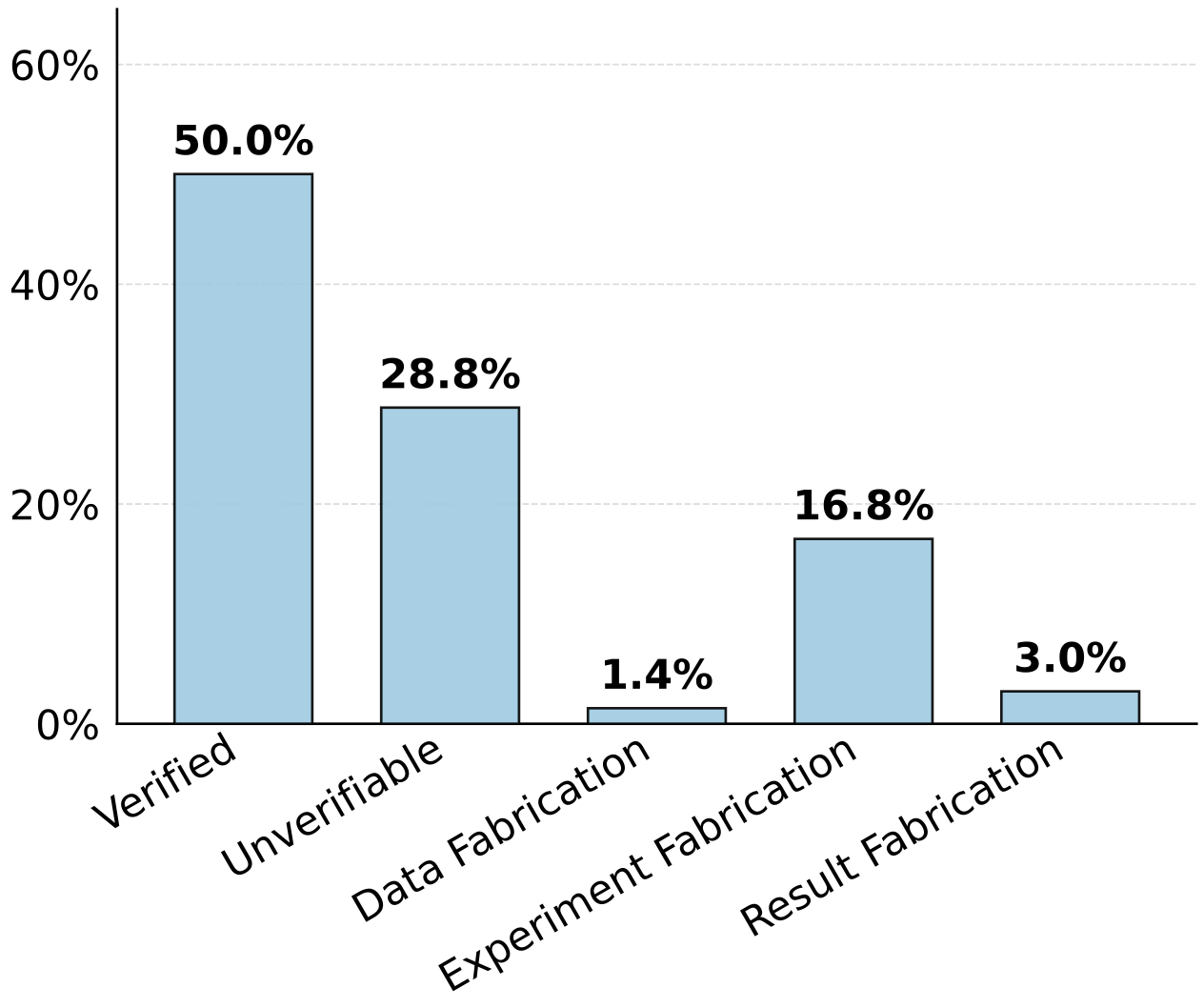
Figure 2: Proportion of each verdict category among 6,978 extracted claims from 144 AI-generated papers.
Claim-level and Paper-level Performance
As shown in Figure 3, claim-level fabrication rates range from 0.4% to 53.6% and paper-level rates from 10.0% to 81.5%. 70.4% of the 54 real conference submissions contain fabrications.
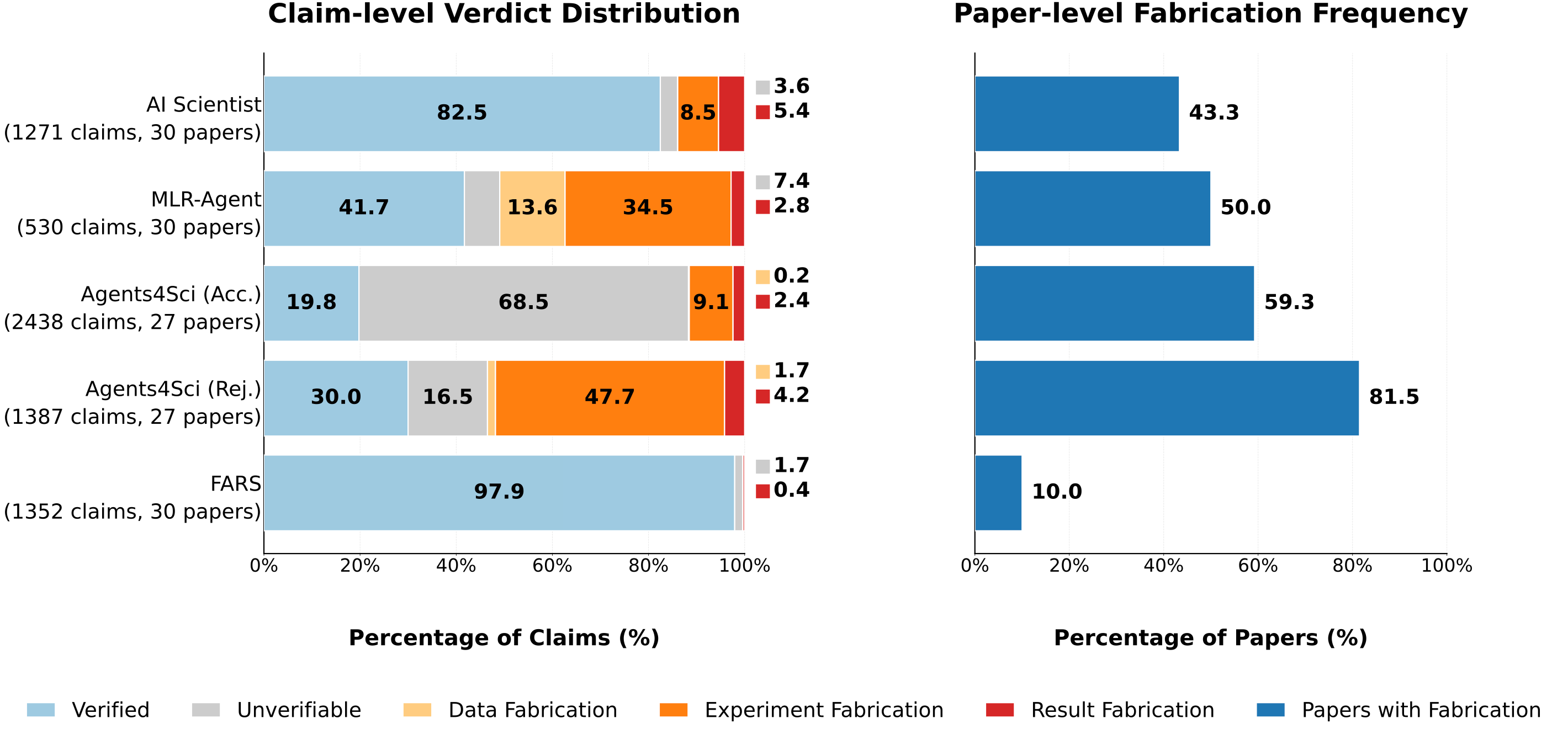
Figure 3: Claim-level verdict distribution and paper-level fabrication frequency across five data sources, where paper-level fabrication frequency is defined as the proportion of papers containing at least one fabrication.
Review Interface
We have developed a unified interface to support human review. If you would like to check out the evaluation results using our interface, please click this link.
Repository Structure
fabscore/
├── fabscore/                    # Core Python package (evaluation pipeline)
│   └── eval/
│       ├── extraction.py        # Stage 1: Result extraction from paper
│       ├── analysis.py          # Stage 2: Static code analysis
│       ├── execution.py         # Stage 3: Code execution
│       └── summarization.py     # Stage 4: Verdict generation & result summarization
├── agents4sci_acc/              # Agents4Science accepted submissions (paper PDFs + code)
├── agents4sci_rej/              # Agents4Science rejected submissions (paper PDFs + code)
├── agents4sci_aireviews/        # AI-generated reviews for Agents4Science submissions
├── aiscientist_papers/          # AI Scientist papers (paper PDFs + code)
├── fars_papers/                 # FARS papers (paper PDFs + code)
├── mlragent_papers/             # MLR-Agent papers (paper Markdowns + code)
├── human_eval/                  # Human evaluation annotations
├── analysis/                    # Analysis scripts and aggregated results
├── plots/                       # Generated figures and plots
├── assets/                      # Images used in README and paper
├── main.py                      # Main orchestrator for the full 4-step pipeline
├── run_agents4sci_acc.sh        # Batch eval script for Agents4Science accepted papers
├── run_agents4sci_rej.sh        # Batch eval script for Agents4Science rejected papers
├── run_aiscientist_papers.sh    # Batch eval script for AI Scientist papers
├── run_fars_papers.sh           # Batch eval script for FARS papers
├── run_mlragent_papers.sh       # Batch eval script for MLR-Agent papers
├── download_aireviews.py        # Script to download AI reviews from OpenReview
├── generate_index_for_viewer.py # Script to build paper_index.json for the viewer
├── paper_index.json             # Index of all evaluated papers (used by viewer)
├── fabscore_viewer.html         # Web-based interface for browsing evaluation results
└── pyproject.toml               # Project dependencies (managed by uv)
Installation
We use uv to manage the environment of this repository. Here are commands for initialing uv in this project.
1. uv init
2. uv venv
3. # add requirements to pyproject.toml
4. uv add requests
5. uv lock
# update packages: uv sync
Install fabscore as a package:
uv pip install -e .
Before running the following steps, ensure you have activated the virtual environment:
source .venv/bin/activate
You can also skip manual activation and run commands through uv run, which is the recommended style.
Usage
The evaluation pipeline consists of 4 modular steps. You can run them all at once using the main orchestrator, or individually for more control.
Full Pipeline Run (Recommended)
Run the entire 4-step process automatically:
uv run python main.py --task_path <path_to_task_directory> --paper_filename <paper_filename_or_relative_path> [--judge_type claude]
Key optional arguments:
--judge_type— Agent to use:claude, orcodex(default:claude)--model_name— Model name override (e.g.claude-sonnet-4-6)--extraction_only— Stop after extraction--analysis_only— Stop after extraction + static analysis--execution_only— Stop after extraction + static analysis + execution, and skip final summarization writeout
Required arguments:
--task_path— Task root directory--paper_filename— Paper filename or relative path inside the task directory, for examplepaper.pdf,results/paper.md, ordata_augmentation_grokking.pdf
Individual Step Usage
You may also execute each stage individually by running:
1. uv run python fabscore/eval/extraction.py --task_path <task_dir> --paper_filename <relative_paper_path> [--judge_type claude] [--model_name <model>]  # Result Extraction
2. uv run python fabscore/eval/analysis.py --task_path <task_dir> --paper_file <relative_paper_path> [--judge_type claude] [--model_name <model>]  # Static Analysis
3. uv run python fabscore/eval/execution.py --task_path <task_dir> --paper_file <relative_paper_path> [--analysis_path <analysis_json>] [--extracted_path <extracted_json>] [--judge_type claude]  # Code Execution
Citation
Please cite our paper if you find our work helpful:
@inproceedings{
chen2026fabscore,
title={FabScore: Fine-Grained Evaluation of Fabrications in Automated {AI} Research},
author={Hui Chen and James Xu Zhao and Dongfu Jiang and Qianyun Guo and Jiefeng Chen and Yiwei Wang and Muhao Chen and See-Kiong Ng and Pang Wei Koh and Bryan Hooi},
booktitle={ICML 2026 AI for Science Workshop},
year={2026},
url={https://openreview.net/forum?id=6gYWcYQcWM}
}
Please feel free to contact hui.chen@nus.edu.sg or open an issue if you have any questions.